

Choosing a baby cam gets easier once you match the setup to your space. Some homes need a Wi-Fi feed you can check from work or travel, while others are happier with a closed, screen-based monitor that stays simple and private. This roundup focuses on those practical differences, so you can skip the noise and focus on what fits your nursery, your routine, and your tolerance for setup.
You’ll also see where each pick makes life easier, and where the trade-offs show up. A wide-screen monitor can feel roomy in a multitasking household, while a camera with app access suits parents who move around a lot. The right choice is usually the one that makes everyday checking feel calm, not complicated.
The Shortlist At A Glance

Nanit Smart Baby Video Monitor Camera & Floor Stand Pro edition

TP-Link Tapo 1080P Indoor Security Camera Tapo C100

HelloBaby No WiFi Baby Monitor 5 Screen 30-Hour Battery HB6550

HelloBaby 4.3 Video Baby Monitor with 30 Hours Battery

Tapo TP-Link 2K Pan Tilt Security Camera C210

HelloBaby Baby Monitor 6 IPS Screen 30H Battery
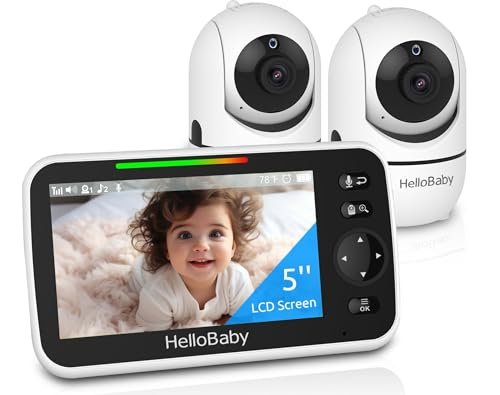
HelloBaby No WiFi Baby Monitor 2 Cameras and Audio HB6550

Security Camera 2K blurams Baby Monitor Dog Camera 360-degree
The floor stand changes the conversation here, because it gives you placement flexibility without needing a shelf right beside the crib. The 1080p camera, two-way audio, and sound, motion, and cry notifications suit a busy nursery where you want a quick check from another room or on the move.
The honest read is that this style leans toward app-based convenience, so you’ll get the most from it in a home that already lives comfortably with Wi-Fi connected gear. For parents who want a cleaner, more modern setup than a bare tabletop camera, it feels like the most polished option in this group.
Strong Points
- Floor stand gives you better placement options than a fixed shelf camera.
- 1080p video helps you make out crib details more clearly on the app feed.
- Sound, motion, and cry alerts cover the most common nursery check-ins.
- Two-way audio lets you speak softly without walking in right away.
- Night vision keeps the view usable after lights-out, which matters during overnight wakeups.
Worth Noting
- Wi-Fi dependency means setup quality matters more than it does with a screen-only monitor.
- The app-first approach may feel like extra steps for grandparents or occasional helpers.
- The floor stand takes more space than a compact tabletop camera.
Core Details
Who It Suits Best
App-comfortable parents who want a more refined nursery setup will get the most out of this one.
A Better Fit Elsewhere
Hellobaby No WiFi Baby Monitor 5 Screen 30-Hour Battery HB6550 suits you better when you want a simple screen and no app login at all.
This one stays compact and direct, which helps in a nursery where you want a camera that doesn’t ask much back. Motion detection, siren support, night vision, and storage options through cloud or a memory card make it useful as a flexible indoor watchpoint rather than a full nursery system.
Compared with the Nanit, it gives you a simpler camera-only path and less of the nursery-specific hardware. That trade-off makes sense for apartments, guest rooms, or a second space where a basic watch camera fits better than a more specialized setup.
Highlights
- 1080p video gives you a clear everyday view for checking the crib or play area.
- Motion detection adds a useful layer for noticing movement in the room.
- Two-way audio helps with quick reassurance from another room.
- Cloud and SD card storage give you two different ways to keep footage.
Areas To Watch
- It works like a general indoor camera first, so nursery-specific convenience is lighter than on dedicated monitors.
- App-based use can feel less immediate than a monitor with its own screen.
- The siren feature is better thought of as an alert tool than a nursery comfort feature.
Feature Rundown
Who Will Love This
Practical shoppers who want a straightforward indoor camera for nursery duty will find this easy to live with.
Look Elsewhere When
Nanit Smart Baby Video Monitor Camera & Floor Stand Pro edition suits you better if a nursery-specific stand and richer app experience matter more.
Screen-first monitors still have a strong place in nurseries, and this one leans hard into simplicity. The 5-inch display, pan-tilt-zoom camera, VOX mode, two-way talk, lullabies, and claimed 1000-foot range create a very practical setup for homes that don’t want app upkeep.
For travel, grandparents’ houses, or rooms where Wi-Fi feels like one more thing to manage, that approach is comforting. The 30-hour battery claim also makes the screen side feel less tethered, which matters during long evenings or overnight stays.
Bright Spots
- No Wi-Fi design keeps setup straightforward and lowers the number of moving parts.
- The 5-inch screen gives you a readable live view without using your phone.
- Pan-tilt-zoom control lets you follow a crib, bassinet, or play space from the parent unit.
- VOX mode helps the screen stay quiet until sound crosses the threshold you set.
- Eight lullabies give you a built-in calming option at bedtime.
Small Caveats
- The larger feature set makes the unit less minimal than a basic audio-only monitor.
- Range claims depend on walls and layout, so real homes can feel different from open-space numbers.
- The included camera and screen need enough charging discipline to stay ready for long stretches.
Details At A Glance
Built With In Mind
Families who want a private, screen-based setup for travel or home use will find this especially easy to live with.
Where A Sibling Pick Shines
HelloBaby No WiFi Baby Monitor 2 Cameras and Audio HB6550 fits better for households that need two rooms covered from one parent unit.
The smaller 4.3-inch screen makes this feel lighter and easier to park on a nightstand, dresser, or kitchen counter. Remote pan-tilt-zoom, night vision, ECO mode, two-way talk, and lullabies give you the core functions most homes actually use, without a lot of extra clutter.
That balance works well in apartments, shared bedrooms, or a second monitor spot where space is tight. Compared with the 5-inch HelloBaby model above, you give up some screen size, but you keep the same no-Wi-Fi simplicity and a very manageable footprint.
Upsides
- 4.3-inch display keeps the unit compact while still giving you a dedicated visual feed.
- 30-hour battery claim helps reduce charging interruptions across the day.
- ECO mode supports quieter, more attentive monitoring by letting the screen sleep between sounds.
- Pan-tilt-zoom controls make it easier to reframe the room from the parent unit.
Minor Gripes
- The smaller screen feels less roomy than the 5-inch HelloBaby unit.
- ECO mode can delay how often the screen wakes, which some parents may prefer to tune carefully.
- The compact body is convenient, but it also means less visual real estate at a glance.
Quick Facts
Whose Shelf It Belongs On
Space-conscious households that want a dependable screen monitor without Wi-Fi dependence will like this format a lot.
A Better Fit Elsewhere
HelloBaby Baby Monitor 6 IPS Screen 30H Battery suits you better when a larger display matters more than a compact body.
Pan and tilt are the headline here, and that matters more than it sounds like on paper. A camera that can track around a room can be a better fit than a fixed-angle unit in a nursery with a crib, toy corner, or changing zone spread across the space.
It also brings 2K video, which gives you more detail than the 1080p Tapo C100 above, along with motion detection, siren support, and storage through cloud or a memory card up to 256 GB. The trade-off is that this is still a camera-first device, so the app experience carries more weight than a dedicated nursery monitor.
Standout Traits
- 2K video gives you a sharper look than 1080p models in this group.
- Pan-tilt control helps you follow movement across a wider nursery or play room.
- Motion detection and siren support broaden the camera's alert toolkit.
- Cloud plus SD card storage gives you flexibility in how footage is managed.
- Two-way audio makes short check-ins easy from another room.
Points To Note
- The camera-first layout is less nursery-specific than a true monitor with its own parent screen.
- Storage management takes a little more attention than a pure live-view setup.
- The stronger feature set can feel like more than some nurseries actually need.
At A Glance
Best Suited To
Parents who want a camera with strong room coverage and a more detailed image will appreciate this one.
Swap It Out When
TP-Link Tapo 1080P Indoor Security Camera Tapo C100 suits you better when simpler 1080p coverage is enough.
The 6-inch IPS screen is the main reason this one stands out, because IPS, short for in-plane switching, usually means better viewing angles and more consistent color than a basic panel. That matters in a kitchen, on a side table, or anywhere you want to glance over without picking up the unit.
It stays Wi-Fi free, adds pan-tilt control, and includes VOX, two-way talk, night vision, and a 1000-foot range claim. Compared with the 4.3-inch HelloBaby model, this one gives you a more comfortable display, and compared with the Nanit, it keeps the whole setup simpler and more closed.
Best Bits
- The 6-inch IPS screen offers more room for quick at-a-glance viewing.
- Pan-tilt control helps you reframe the nursery without entering the room.
- VOX mode keeps the screen from staying lit all the time.
- Two-way talk and night vision cover the basics most households use daily.
- The no-Wi-Fi design keeps setup straightforward.
Room For Improvement
- The larger screen makes the parent unit less pocketable than smaller models.
- Range is still affected by the layout of your home, especially through walls.
- The more generous screen can tempt you to keep it out in the open, so storage space matters a bit more.
Feature Snapshot
Right Fit For
Households that want a larger screen without stepping into app-based monitoring will feel at home with this model.
Another Choice May Suit
HelloBaby 4.3 Video Baby Monitor with 30 Hours Battery fits better for tighter spaces where a smaller parent unit is easier to stash.
Two cameras make this one especially useful in homes with two rooms to keep an eye on, or one nursery and one play space that both need attention. The 5-inch screen, no-Wi-Fi design, and easy setup keep it approachable, while the claimed 1000-foot range supports larger layouts better than many basic monitors.
For travel, split caregiving, or families who want a single parent unit watching more than one spot, the appeal is pretty clear. Compared with the single-camera HelloBaby options, this gives you more coverage in one package, though the screen still stays portable enough to move around the house.
Positives
- Two included cameras make multi-room coverage much easier.
- The 5-inch display keeps the parent unit comfortable to use.
- No-Wi-Fi operation lowers setup friction and keeps the system self-contained.
- Clear day and night viewing supports routine room checks across different lighting.
- Portable design suits travel and room-to-room movement.
Softer Spots
- Two cameras mean a little more placement planning than a single-camera kit.
- It still depends on battery management and charging habits like the other HelloBaby units.
- The 5-inch screen is useful, though not as roomy as the 6-inch option above.
Core Details
The Right Fit
Families covering two rooms from one parent unit will get the most out of this setup.
Reach For A Different Pick When
HelloBaby No WiFi Baby Monitor 5 Screen 30-Hour Battery HB6550 suits you better if a single-camera setup is all you need.
A 360-degree camera can be very handy in a nursery or play room where the action spreads out instead of staying in one crib corner. The 2K view, smart motion tracking, IR night vision, siren, and two-way audio give it a stronger feature stack than a simple fixed indoor camera.
That said, this is still a general security camera shaped into baby-monitor duty, so it suits app-comfortable homes best. Compared with the Tapo C210, it leans on a similar wide-view idea, while the blurams motion tracking adds a different feel for rooms where movement is less predictable.
What We Like
- 360-degree coverage works well in wide or busy rooms.
- 2K video adds helpful detail for live viewing.
- Smart motion tracking follows activity instead of leaving it at the edge of frame.
- IR night vision keeps the camera useful after dark.
- Two-way audio gives you a quick way to speak without entering the room.
Honest Caveats
- The camera-first design feels more like a home security tool adapted for nursery use.
- App-based control means you'll want a phone-centered routine.
- A 360-degree unit can take a little tuning to place well at first.
Technical Sheet
Perfect Match For
App-friendly households that want wide-room coverage from a single indoor camera will find this a smart fit.
Consider Something Else When
HelloBaby No WiFi Baby Monitor 2 Cameras and Audio HB6550 is the better route when you want a screen-based, two-camera home setup.
How To Choose The Right Baby Cams
Wi-Fi Or Screen-Only?
Wi-Fi cameras suit parents who want to check in from a phone, a work desk, or another floor of the house. Screen-only monitors suit homes that want a closed system with no app sign-in or account juggling.
The trade-off is convenience versus simplicity. App-linked cameras usually bring richer alerts and remote access, while dedicated screens often feel quicker for overnight use.
Screen Size And Placement Matter
A 4.3-inch display is easier to stash, but a 6-inch or 5-inch screen can feel much friendlier during long evenings. Placement matters too, since a floor stand or pan-tilt camera changes how much of the room you can cover from one spot.
Nurseries with tight shelving often benefit from compact hardware. Rooms with changing tables, cribs, and play corners usually do better with a camera that can move or sit higher.
Battery Life And Night Use
Battery claims matter most when you move the monitor from room to room or take it on the road. A longer-runtime parent unit reduces the number of times you have to think about charging before bedtime.
Night vision and sound-activated modes also shape how peaceful the monitor feels after dark. Those features can make overnight checks smoother, especially in a room where light should stay low.
Storage, Alerts, And Everyday Use
Storage options matter more on camera-based models. Cloud, SD card, and motion alerts help you keep a record or review activity later, while two-way audio turns a camera into something you can respond through, not just watch.
For many homes, the right choice is the one that keeps daily use simple. The best fit is usually the monitor you’ll keep powered, positioned well, and actually reach for at 2 a.m. without second-guessing it.
A Quick Reality Check Before You Choose
Common Shopping Slip Ups
One common miss is choosing a camera with too many features for a small nursery. A second is overlooking placement, which matters just as much as resolution in a room with shelves, curtains, and crib rails.
Another easy mistake is forgetting how the monitor will be used by other caregivers. Screen-based units are easier for many households to hand off, while app-based models need a little more comfort with setup.
What The Higher Tier Buys
More expensive models usually spend that extra cost on stronger screens, wider room coverage, and smarter camera movement. You also tend to get more flexible storage, clearer alerts, and a cleaner parent-unit experience.
That upgrade makes the most sense in busy homes, travel-heavy routines, or larger spaces where a basic fixed camera starts to feel limited. For a small nursery, though, a simpler model can be the calmer choice.
Frequently Asked Questions
Do Wi-Fi baby cams work without a phone app?
Most Wi-Fi models lean on an app for viewing and alerts. Screen-based monitors are the better match for a phone-light setup.
Is a bigger screen always better?
Not always, because bigger screens take up more space and can be less portable. The right size depends on where you keep the parent unit.
What does pan-tilt-zoom actually help with?
Pan means side-to-side movement, tilt means up and down, and zoom brings the image closer. Those controls help one camera cover more of a room.
Why do some monitors mention VOX?
VOX means the screen stays quiet until sound is detected. That can make nighttime use less distracting.
Which type works better for travel?
Screen-based monitors are usually easier for trips because they do not depend on Wi-Fi. A compact parent unit also packs more neatly.
Closing Thoughts
The strongest baby cam for your home is the one that matches your routine without adding friction. App-based cameras fit connected households, while screen-only monitors keep things simpler and more private. A larger display helps in busy spaces, and two cameras matter when one room is not enough. Start with the way you actually move through the day, and the right pick becomes much easier to spot.